Key Takeaways
A practical BytesFlows residential proxy setup guide covering Dashboard configuration, rotating and sticky sessions, GEO targeting, HTTP/SOCKS5 verification, safe failure diagnosis, and production-readiness checks.
BytesFlows Residential Proxy Setup: Rotation, Sticky Sessions, GEO & Testing
To use a BytesFlows residential proxy safely, generate the endpoint and credentials in your Dashboard, choose only the GEO and session controls your account exposes, verify the exit route with a low-volume request, and then test the real authorized workload before scaling. A successful IP check proves routing only; it does not prove target compatibility, GEO correctness, session continuity, or production success.
This guide is for developers, SEO teams, e-commerce analysts, QA engineers, and data teams working with public or otherwise authorized resources. Start with the residential proxy product page, check current pricing, and confirm the required market on the locations page. The live Dashboard remains authoritative for account-specific hostnames, ports, credentials, targeting syntax, limits, and available settings.
What BytesFlows Is Useful For
Residential proxies can support legitimate workflows such as:
- checking localized pages, currencies, languages, and redirects;
- monitoring public search results by market;
- testing your own regional landing pages and advertising destinations;
- collecting public prices, inventory, or market information with permission;
- running browser and API QA from different GEOs;
- monitoring the availability of websites and applications you operate.
A working proxy connection does not grant permission to access a target. Review the target website's terms, robots rules where applicable, API policies, rate limits, and relevant laws. Do not use proxies for credential attacks, spam, fraud, account farming, KYC evasion, unauthorized private-data collection, or bypassing access controls.
Choose Rotating or Sticky Sessions
BytesFlows exposes residential routing with rotating and sticky session controls. Choose the mode from the behavior your workflow needs, not from the idea that more rotation is always better.
| Workflow | Starting mode | Why |
|---|---|---|
| Independent public pages or SERP snapshots | Rotating | Requests do not need to share cookies or one exit route |
| Multi-page localization QA | Sticky | One short workflow can retain route and cookie continuity |
| Cart or form testing on your own site | Sticky | State changes are less likely to conflict with an IP change |
| Broad catalog or availability monitoring | Rotating | Independent jobs can distribute across the residential pool |
Sticky does not mean permanently reserved. A residential route can disappear, and session duration is bounded by the current Dashboard contract. Copy the duration and session syntax shown in your account rather than using a value from an old article.
For a deeper comparison, see rotating versus sticky proxies, rotating residential proxies, and sticky residential proxies.
First Setup in the Dashboard
1. Sign in and check available traffic
Open the BytesFlows sign-in page and authenticate using your own account. Never paste account passwords into a script or screenshot. On the Dashboard overview, check the remaining traffic and recent usage before starting a test so you have a baseline.
If you still need traffic, compare the live packages on Pricing. Do not assume a package renews, carries unused traffic forward, or includes a particular limit unless checkout or the applicable service terms explicitly say so.
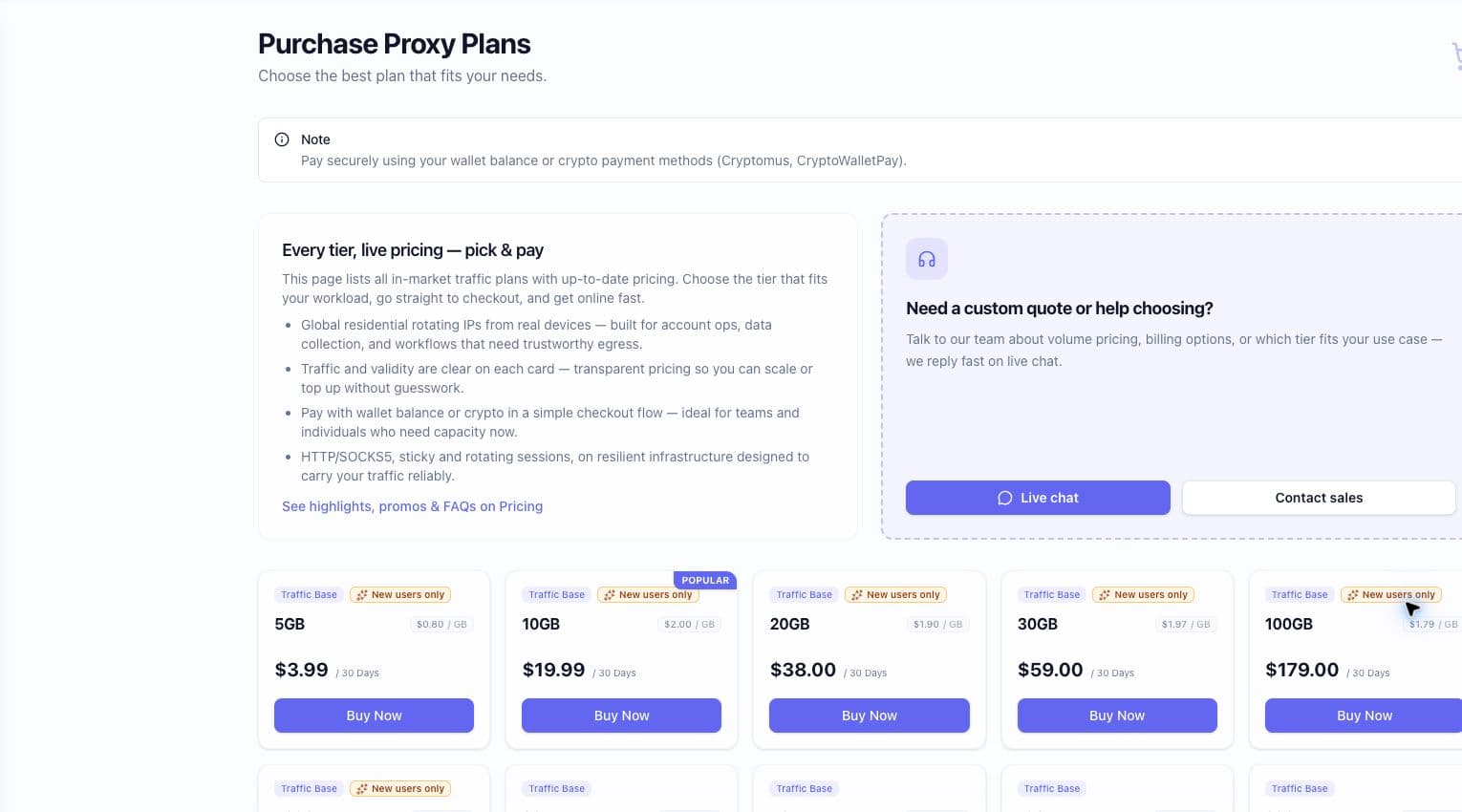
2. Open Residential Proxies and create a proxy user
In the Residential Proxy workspace, create or select a proxy user. Proxy credentials are separate operational secrets: store them in a secret manager or local environment variable, not in source control.
If the account lets you assign a traffic limit to a proxy user, use a conservative limit for the first integration. This makes unexpected browser resources, retries, and background requests easier to contain.
3. Choose authentication
Use the authentication option shown by the current Dashboard:
- Username and password is convenient for local development, CI secrets, and clients whose source IP changes.
- IP whitelist avoids embedding a proxy password in supported environments with a stable outbound IP.
Whitelist the real public egress address of the application, not a private 10.x, 172.16-31.x, or 192.168.x address. Confirm whitelist limits and propagation behavior in the Dashboard or with support before relying on it in production.
4. Select GEO and session behavior
Choose only the targeting dimensions offered by the endpoint generator. Start with a country. Add a city or ASN only when the workflow genuinely requires that precision and the selection is available in the account.
For rotating work, leave sticky-session controls disabled. For a stateful test, create a unique session identifier and choose a duration within the Dashboard's accepted range. Do not reuse one sticky session across unrelated workers.
5. Copy the generated connection
Copy the connection string from the Endpoint Generator. Do not construct the production hostname, port, or username syntax from a marketing screenshot. Replace the examples below with the exact account-specific values.
For a disposable local test, replace the placeholders below with values copied from the Dashboard. Be aware that credentials placed directly on a command line can be exposed through shell history or process inspection; use your normal secret-injection mechanism for CI and production.
HTTP proxy test:
SOCKS5 test, only when the Dashboard confirms a SOCKS5 endpoint for the account:
In curl, socks5h:// delegates destination-hostname resolution to the SOCKS5 proxy; socks5:// resolves the destination locally. SOCKS5 itself is not an encryption layer, so use HTTPS for sensitive application traffic.
Verify the Proxy Before Production
The first successful request proves connectivity, not production quality. Use the BytesFlows Proxy Test and your own controlled test script to record:

- requested and observed country, region, and city;
- exit IP, ASN, and ISP where relevant;
- HTTP status and failure category;
- connection time, time to first byte, and total duration;
- transferred bytes and Dashboard traffic delta;
- session identifier and whether the job is rotating or sticky.
Test rotation
Send multiple independent requests without a sticky session and record each exit IP. Avoid assuming that rotation guarantees a never-before-seen IP on every request. Connection reuse can also affect what you observe, so repeat the test with fresh connections when investigating rotation behavior.
Test sticky continuity
Use one generated sticky session for a short series of requests. Confirm the IP and application state remain consistent long enough to complete the workflow. Then repeat after the configured window. If the residential route goes offline, the service may need to replace it; treat continuity as testable behavior, not a permanent allocation.
Measure stability and cost
Test the actual destinations at low volume across several times of day. Report median and p95 latency separately from download speed. Calculate useful-output rate and traffic per useful result. Browser automation may download scripts, fonts, images, video, analytics, and background APIs, so its traffic can be much higher than a direct HTTP request.
Practical Workflow Example
Consider an e-commerce SaaS team validating its own US, German, and Japanese storefronts.
- Use rotating country-targeted sessions for independent public product-page checks.
- Use a short sticky session for each cart and localization QA path.
- Record requested GEO, exit IP, page language, currency, response status, latency, and transferred bytes.
- Compare the usage visible in the Dashboard with application-side measurements.
- Scale only after the team knows the cost per successful check and the target workflow remains within its permitted rate limits.
Troubleshooting
| Symptom | Likely checks |
|---|---|
407 Proxy Authentication Required | Stop target-side retries. RFC 9110 defines 407 as a proxy-authentication challenge; verify credentials, endpoint/port and whitelist mode before testing the destination again. |
| GEO differs from the request | Compare multiple GeoIP sources and the target's actual localized output; verify live GEO availability |
| Exit IP does not change | Check for a sticky parameter, session reuse, or persistent connections |
| Sticky IP changes early | Check session syntax and duration; record whether the original residential route disconnected |
| SOCKS5 connects but DNS is wrong | Use a remote-DNS client mode such as socks5h and verify client support |
403, 429, or CAPTCHA | Reduce request rate, inspect target policy and workflow behavior, and do not blindly retry |
| Traffic falls faster than expected | Cap retries and compare application-side transfer measurements with the Dashboard delta. If testing browser resource blocking, run an A/B check first because blocking scripts, fonts or APIs can change application behavior and invalidate the result. |
Target-specific blocking is not proof that the proxy network is offline. Conversely, a successful IP-check request does not prove that every target will accept the route.
A First-Week Plan
- Day 1: Read the current Terms, choose one legitimate workload, and record the Dashboard traffic baseline.
- Day 2: Create a limited proxy user and verify the selected authentication method.
- Day 3: Test one country with a small rotating sample and classify failures.
- Day 4: Test one stateful workflow with a unique sticky session.
- Day 5: Measure the actual destination at low volume, including p50/p95 latency and useful-output rate.
- Day 6: Reconcile application measurements with Dashboard traffic records.
- Day 7: Decide whether to scale, change session strategy, or ask support to confirm an operational limit.
Check Before You Pay or Scale
Confirm the following in the live Dashboard, checkout, applicable terms, or with support:
- current packages, taxes, payment methods, validity, renewal, and carry-over rules;
- live country, city, and ASN availability;
- account-specific hostnames, ports, protocols, and authentication syntax;
- concurrency, request-rate, whitelist, and proxy-user limits;
- sticky duration and behavior after an exit route disconnects;
- API availability, authentication, usage retention, and rate limits;
- refund, credit, replacement, suspension, and SLA conditions.
BytesFlows proxies can still encounter blocks, CAPTCHA, route instability, GEO database disagreement, session expiration, and variable latency. They do not guarantee access to every platform or override a target's rules.
Screenshot Safety
The screenshots in this guide are cropped to exclude email addresses, passwords, proxy credentials, account names, tokens, wallet balance, order IDs, affiliate codes, and identifiable traffic records. Apply the same review to any replacement screenshots before publishing them.
Next Step
Start with the smallest currently available option that fits the test, generate the connection inside the Dashboard, and validate it against one real permitted workflow. Use the proxy guides for protocol and session comparisons, then review live pricing only after measuring traffic per useful result.
Alex Vance
Lead Proxy Network Architect
Reviewed by the BytesFlows engineering team. Examples are written for compliant public-web data collection, QA, SEO monitoring, and market research workflows. Results can vary by target site, country, client runtime, and request rate.